

CAD software is essential for engineers, designers, and manufacturers. Whether you’re creating mechanical parts, product visuals, or prepping files for 3D printing, the right tool can make all the difference.
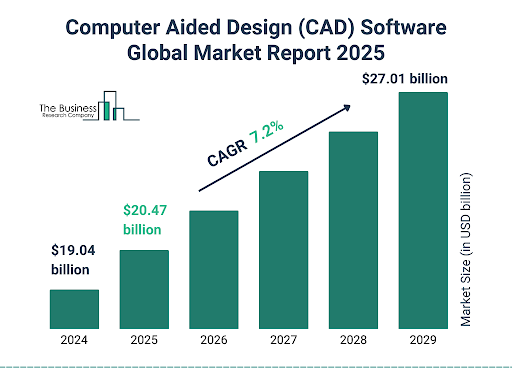
Source: The Business Research Company
Today, there’s a wide range of CAD options—some built for heavy-duty assemblies, others for sculpting and concept modeling, and many that sit somewhere in between. You’ll also find everything from free, browser-based tools to professional platforms used in aerospace and automotive.
In this guide, we’ll break down the most popular CAD programs based on who they’re best for and what they actually offer. If you’re also looking to 3D print your designs, we’ll point out which CAD software pairs well with that workflow.
This article is here to help you compare features, pricing, and use cases—so you can find software that fits your needs, skills, and budget.
Key Features To Consider When Choosing CAD Software
Choosing the right CAD software isn’t just about brand names—it’s about finding tools that match your workflow, budget, and goals. Whether you’re an engineer building precision parts or a designer shaping product concepts, here are the core features you’ll want to look at closely.
2D vs. 3D Modeling Capabilities
If you’re just creating flat technical drawings, 2D CAD packages might be all you need. But for anything involving manufacturing, prototyping, or visualization, 3D CAD packages are essential. Most professional users today rely on 3D modeling to better understand form, fit, and function before production.
Keep in mind, many free CAD software programs offer basic 2D drawing tools, while premium or affordable 3D CAD options provide full 3D modeling capabilities.
Parametric vs. Direct Modeling
Parametric modeling lets you build features based on dimensions and constraints—great for when your designs need to be updated regularly. Direct modeling, on the other hand, is faster for one-off designs or conceptual work where you don’t need to track a detailed history.
If you’re working in teams or on parts that evolve, go for parametric. For quick, flexible edits, direct modeling might be more efficient. Some inexpensive CAD programs even offer both in one package.
Simulation and Analysis Tools
Look for software that includes simulation features like:
- FEA (Finite Element Analysis) – to test stress and load.
- CFD (Computational Fluid Dynamics) – for analyzing airflow or fluid movement.
- Motion analysis – for understanding how parts interact.
These tools are often found in mid-to-high-tier software, but a few affordable CAD software packages include basic versions.
CAM and 3D Printing Compatibility
If you’re moving from design to production, make sure your CAD software can export STL, STEP, or IGES files—formats commonly used in CAM tools and 3D printing.
For those using 3D printers at home or in the office, there are computer aided drawing software free download options that work well, like Fusion 360’s free startup license or free 3D CAD drawing programs like FreeCAD.
Cloud-Based vs. Desktop
Cloud CAD platforms like Onshape and Fusion 360 offer real-time access, updates, and collaboration across devices. They’re ideal for remote teams or users on the go. But if you’re working with sensitive data or need robust local processing, desktop CAD software systems might be a better fit.
Just remember: some cheap CAD software options come with storage limits or reduced features in cloud versions.
Collaboration and File Sharing
For teams, real-time collaboration tools are a big plus. Some platforms let multiple users work on the same file simultaneously. Others offer comment and versioning tools that help keep everyone aligned.
This is especially useful for manufacturers and design studios sharing files with clients or suppliers.
Customization, APIs, and Plugins
If you need to automate repetitive tasks or add custom features, check whether the CAD system supports APIs or scripting. Popular platforms like SolidWorks and Rhino offer robust plugin ecosystems.
Even some free CAD systems include plugin support or let you integrate with open-source tools.
Elevate Your 3D Printing with Additive Plus
If you’re ready to take your 3D printing projects to the next level, Additive Plus is here to help. With over 10 years of experience, we specialize in helping clients integrate and optimize 3D printing technologies seamlessly into their operations.
Our curated portfolio features industry-leading brands like Farsoon Technologies, Kings3D, offering a wide range of materials and services to meet diverse needs. From design to consulting, we provide the expertise and tools to bring your ideas to life.
Frequently asked questions
What is the significance of particle size and shape in 3D printing of metal components?
Particle size and shape are critical parameters that influence the flow behavior of powders, the operating conditions of the printer, and the properties of the final product. Round particles in a narrow size range typically flow better and allow for more homogeneous deposition. However, if the size range is too narrow, it can lead to lower packing density and potential voids in the final component.
How does the CAMSIZER X2 improve particle analysis compared to traditional methods?
The CAMSIZER X2 utilizes Dynamic Image Analysis (DIA), which measures both the length and width of particles independently, providing a more accurate representation of particle shape and size. In contrast, traditional methods like laser diffraction only calculate one size parameter based on a spherical model, which can lead to misinterpretation of irregularly shaped particles.
What types of metal powders can be analyzed with the CAMSIZER X2?
The CAMSIZER X2 can analyze a variety of metal powders, including aluminum, cobalt, chromium, inconel, manganese, molybdenum, nickel, steel, titanium, tungsten, silver, gold, and their respective alloys.
Can CAMSIZER X2 help in maintaining consistent quality in additive manufacturing?
Yes, by providing comprehensive analysis of particle size and shape, the CAMSIZER X2 ensures that only high-quality powders are used in the printing process. This consistency is vital for producing reliable and high-performance components in additive manufacturing.
What information does the CAMSIZER X2 provide about particle dimensions?
The CAMSIZER X2 measures particle width, length, and equivalent circle diameter. This detailed analysis helps in understanding particle shape and size distribution, which is crucial for applications like additive manufacturing.
How quickly can the CAMSIZER X2 perform measurements on metal powders?
The CAMSIZER X2 can perform measurements on metal powders in less than 20 seconds per sample. This high throughput makes it suitable for rapid quality control and analysis in industrial applications.
What types of metal powders can be analyzed with the CAMSIZER X2?
The CAMSIZER X2 is capable of analyzing a variety of metal powders, including titanium and steel, among others. It is particularly effective for fine powders with a particle size down to 1 μm
How does dynamic image analysis benefit additive manufacturing processes?
Dynamic image analysis with the CAMSIZER X2 provides valuable insights into particle shape and size distribution, which are essential for optimizing raw and recycled materials in additive manufacturing. The ability to detect small amounts of oversized particles and deviations from desired shapes enhances the overall quality and performance of printed components.
Have a question or a project? Let’s talk.
Tell us what you need — a real applications engineer replies within 24 hours. NDA standard, no sales script.